This guide contains the key functions and instructions related to the patient treatment path in AssisDent. The links then provide more detailed descriptions and instructions for each topic.
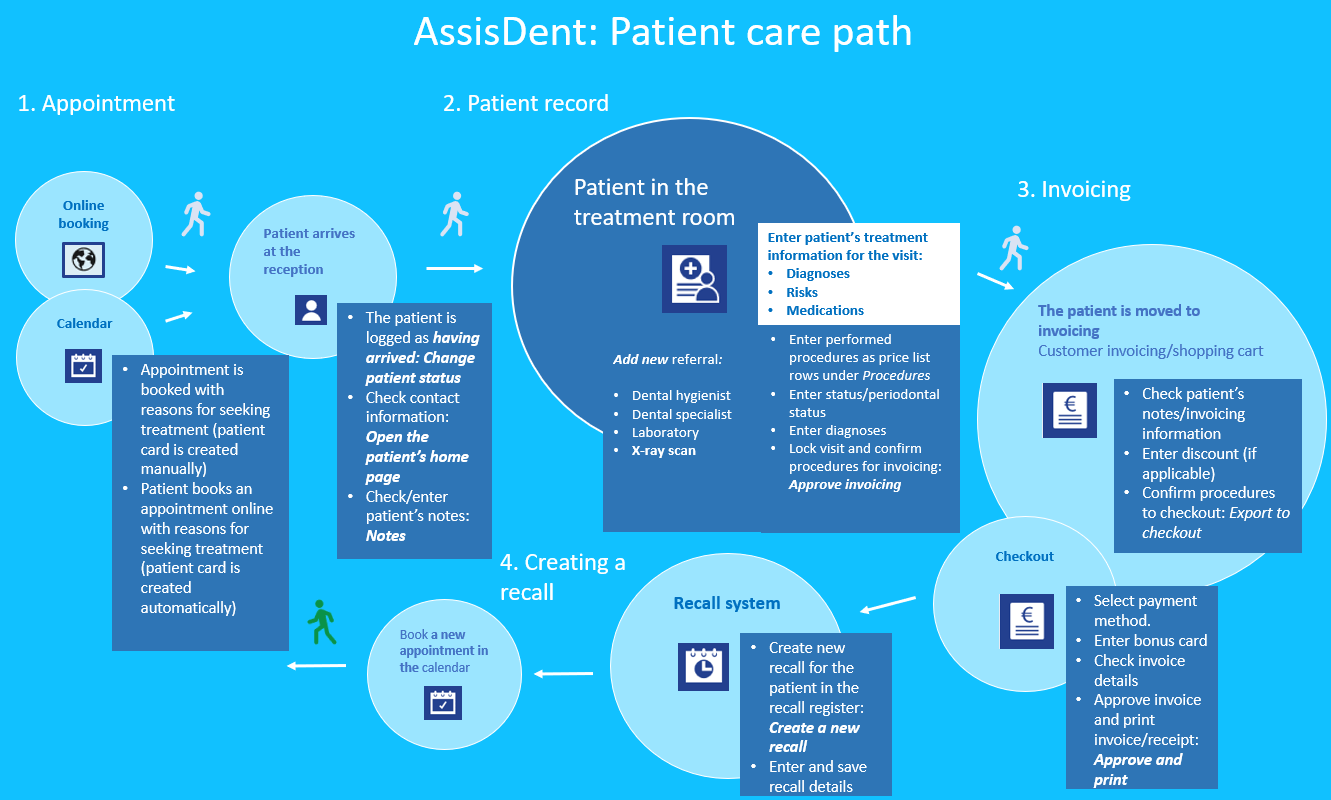
Appointments
An appointment can be booked for the patient directly from the calendar, or alternatively the patient can themselves book an appointment online.
- Instructions on making appointments: Making an appointment
- Instructions on moving an appointment: Moving an appointment
- Instructions on editing an appointment: Editing an appointment
- Instructions on canceling an appointment: Canceling an appointment
Booking an appointment online
To use Internet appointments, you need to first enter the necessary settings in the system settings before introducing Internet appointments for visits.
- To enable Internet appointments, you need to create the settings for these. See instructions: Taking into use online appointment booking
- In order to be able to make an appointment, there must be working hours in the calendar that can be booked online. See instructions: Creating working hours that can be booked online
- You can create your own reasons for seeking treatment as well as employee-specific settings for Internet appointments: See instructions: Employee-specific Internet appointment settings.Please note: Employer-specific settings overrule the system settings for reasons for seeking treatment.
Patient record
The patient record for each patient consists of their service events and related documents. The patient record is divided into three sections: plans, treatment and history.
- Instructions for the patient record in AssisDent: Patient record
- Instructions for creating patient documents in AssisDent: Patient documents
- To view and edit the treatment history in the patient record: Patient’s treatment history
- Instructions for adding forms to a visit: Forms
- Instructions for printing patient records: Printing patient records
Adding entries to the patient record
A patient's treatment visit and the related observations and procedures are recorded in the patient record in the AssisDent visit document. Observations, for example in connection with examinations, can be recorded to the status and the periodontical status.
- Instructions for creating entries in the patient record: Creating entries
- Instructions for creating and using visit templates: Visit templates
- Instructions for using different quick entry abbreviations: Quick entry examples
- Instructions for recording observations in the patient status: Status
- Instructions for recording periodontical observations for periodontical status: Periodontical status
- Instructions for using phrases to facilitate making records: Phrases
Invoicing
Once the procedures / price list rows have been added to the visit and approved for invoicing, they can be invoiced to the patient via either the invoice view or the shopping cart, in which case the price list rows are exported to the checkout. In the checkout, you can select the desired payment method and, if needed, set a service fee / invoicing fee.
- Instructions for invoicing: Patient invoicing
- Instructions for invoicing view and shopping cart: Invoicing view and shopping cart
- Instructions for payment methods and checkout: Checkout view
Recalls
In order to maintain the treatment relationship with the patient, they can be recalled using the AssisDent recall system. The recall can also be set to repeat automatically every year or after the desired time interval, so that you do not have to create the recall again.
- Instructions for the recall register: Recall navigation and recall register
- Instructions for editing and batch editing of recalls: Editing recalls and Batch editing recalls.
- Instructions for canceling recalls: Canceling recalls